Apprendre
Écosystème

par 献慧 陈
Developer Tools · $1.99 · 4+ · Sortie mai 2026
DraftCode rapporte environ $100 par mois sur l’App Store américain (estimation Bloxks, novembre 2026).
Revenu estimé / mois
$100
Fiabilité faible
Téléchargements / mois
8
Estimation
Rang top revenus
—
Hors classement
Note
★ 5
3 avis
Pas encore assez d’historique : cette app n’est pas restée assez longtemps dans le top revenus.


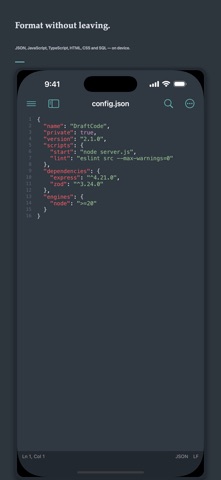

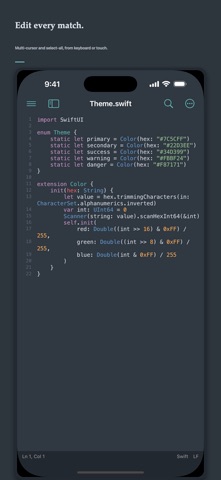
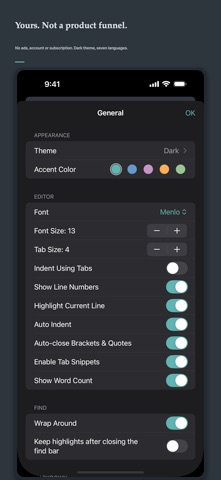
DraftCode is a private code, text and Markdown editor for Mac, iPhone and iPad. Open local files or folders, start typing immediately and keep your work in standard file formats. One-time purchase: no ads, account, tracking, subscription or in-app purchase. EDIT CODE AND TEXT • Syntax highlighting and language detection for 57 languages • Tabs, split editing, line numbers, minimap, bookmarks and code snippets • Multi-cursor editing and select next or all matching occurrences • Auto-indent, bracket pairing, comments and a scrollable code-key toolbar • Code folding with bracket and HTML/XML tag matching • Open files and project folders through Apple system pickers LANGUAGES AND THEMES • Built-in engines for Swift, Python, JavaScript, TypeScript, Go, Rust and more • Import TextMate grammars, language configuration, syntax themes and file-icon themes • Enable, disable, replace or remove packs, with a safe return to built-in defaults SEARCH AND NAVIGATE • Plain text, escaped and regular-expression search • Find and replace across a selected project folder • Command palette, quick open, outline and TODO navigation FORMAT LOCALLY • JSON, JSON5, HTML, CSS, SVG, SQL, YAML, TOML and plist • JavaScript, TypeScript, JSX and TSX format and compress on device • Full file or selection, with undo, error locations and large-file protection REMOTE WORKSPACES • Connect to FTP, explicit FTPS and SFTP servers • Open SSH Terminal from the start page or menus without SFTP • Browse folders, download text files on demand and upload saved changes • Keep passwords in Keychain, detect server-side conflicts and reconnect automatically SOURCE CONTROL • Clone Git repositories over HTTPS or SSH into a folder you choose • Stage, commit, branch, merge, fetch, pull and push on this device • Store passwords, tokens and pasted SSH private keys in Keychain; confirm the host fingerprint before saving it. On Mac, authorize local SSH files instead — those private keys are not copied into Keychain OPTIONAL AI EDITING • Off by default. Prefers on-device Apple models; otherwise your HTTPS endpoint receives only the current selection when you invoke it • Failures never change the document MARKDOWN • Local preview with tables, task lists, code, Mermaid and math • Side-by-side editing on supported layouts • HTML export on Apple platforms and PDF export on Mac Local documents are never uploaded automatically. Remote transfers go only to a server you explicitly configure. DraftCode does not collect personal data. SSH TERMINAL Open an interactive SSH terminal for your server with password or Ed25519 authentication, host-key verification, control keys and window-size synchronization. Commands run only on your remote server. Backgrounding disconnects the session; reconnect starts a new shell without replaying commands.
Estimations basées sur les données publiques de l’App Store (États-Unis). Ce ne sont pas des chiffres officiels.
Décris l’app, Bloxks la construit et la publie sur l’App Store.
Créer mon app