

RevenueCat
Sell subscriptions in your app and track your revenue.
Official RevenueCat docsWhat is RevenueCat?
RevenueCat is the tool that lets your app sell subscriptions and in-app purchases. It handles the hard parts of App Store payments: products, receipts, renewals, refunds. Bloxks uses it to turn your app into a business.
What it unlocks in Bloxks
- Paywall: Bloxks designs the screen where users subscribe, matched to your app’s look, and wires it to real products.
- Products and offers: monthly, yearly, lifetime, free trials. Describe your pricing in the chat and Bloxks creates the products in RevenueCat.
- Premium access: lock features behind a subscription. Bloxks checks who has paid and shows the right content to the right users.
- Revenue tracking: subscribers, trials, churn and revenue, all visible in the RevenueCat dashboard in real time.
Connect RevenueCat to Bloxks
- Open Connections in Bloxks and pick RevenueCat.
- Click Connect RevenueCat. A RevenueCat window opens.
- Sign in, or create a free account.
- Authorize Bloxks. You come right back, connected.
Prefer manual keys? You can also paste a secret API key (sk_...) per project from the RevenueCat dashboard, under Project settings, then API keys. With a pasted key, though, Bloxks cannot create the RevenueCat project and apps for you: you would have to create them yourself. The Connect RevenueCat button is the recommended path.
Test a purchase before publishing
In the Paywall tab, switch Purchase mode to Test: purchases in the builder’s web preview go through RevenueCat’s Test Store, really unlock premium and show up in your dashboard, without an Apple account or a single cent. Every publish switches back to Production on its own.
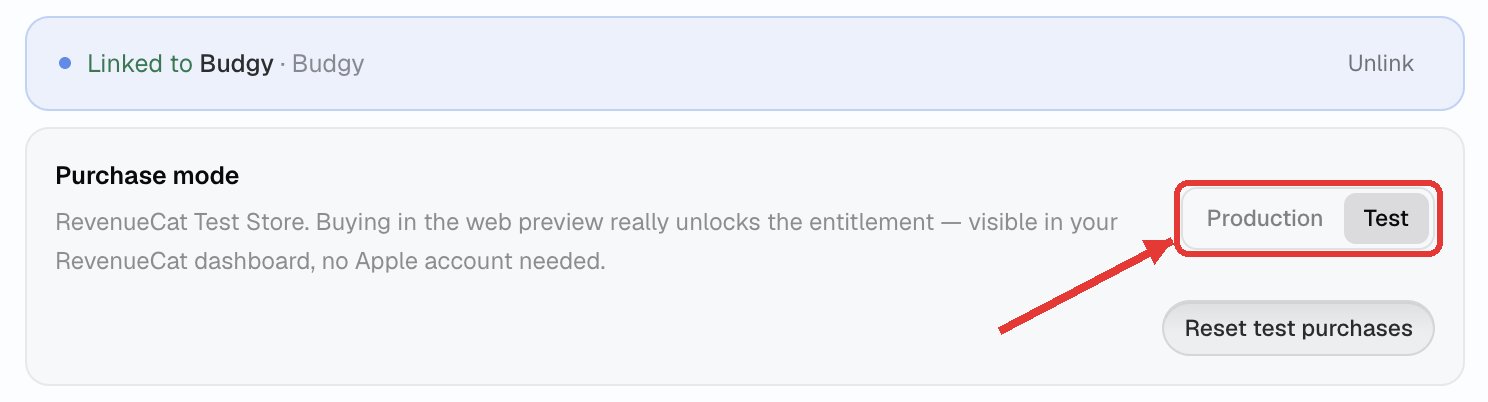
Step by step, with the Test Store setup in RevenueCat: Test purchases.
Good to know
- RevenueCat is free until your app makes real money, so there is no risk in starting.
- Every payment in a Bloxks app goes through RevenueCat: it is the reliable, Apple-approved way to sell subscriptions.
- Prices are set on the stores. When you publish, Bloxks creates your subscriptions and their prices on the App Store and Google Play, then links them in RevenueCat.
- Bloxks also gives RevenueCat your Google Play credentials. One setting remains on your side in RevenueCat before real sales: the Apple in-app purchase key. The full checklist: Paywall and subscriptions.
Want to go deeper? Read the official RevenueCat docs.
Go further
The pages of this documentation that use RevenueCat.
Paywall and subscriptions
Design a paywall, plug in RevenueCat and sell subscriptions for real on the App Store and Google Play.
Create a paywall
Create your paywall in the Paywall tab, adjust it by describing changes, and set the plans it sells.
Test purchases
Try a real purchase in the builder preview with RevenueCat’s Test Store, for free, and see it in your dashboard.
Apple paid apps agreement
The agreement Apple requires before any subscription loads, even in testing: how to sign it, with your bank and tax details.
Apple in-app purchase key
The one purchase setting Apple keeps for you: generate the key and give it to RevenueCat, so every purchase is recorded.
Apple notifications
Let Apple warn RevenueCat the moment a subscription renews, is cancelled or refunded. One click in RevenueCat.
Send your first subscription for review
Apple reviews your first subscription together with your app. Here is the 2-minute step on App Store Connect: Bloxks does the rest.
Frequently asked questions
RevenueCat is free until your app makes significant revenue. So trying it costs you nothing.
Yes, with Test mode in the Paywall tab: the purchase goes through RevenueCat’s Test Store, unlocks premium in the preview and appears under Customers, then Sandbox. Nothing is charged. See Test purchases.
Almost always a store setting, not your app: the Apple paid apps agreement, the Apple purchase key, or products not propagated yet. The full list is in Paywall and subscriptions.
RevenueCat is missing the Apple in-app purchase key: without it, the purchase is not recorded. Follow Apple in-app purchase key.
Yes. Bloxks creates the products on both sides and links them to the same premium access, so a subscriber stays subscribed on both.